Subcontractors can add credit cards to enable automatic monthly billing.

Adding a credit card

  1. Access Payment Methods via the email link or navigate to Odin > Contractors > Payment Methods.
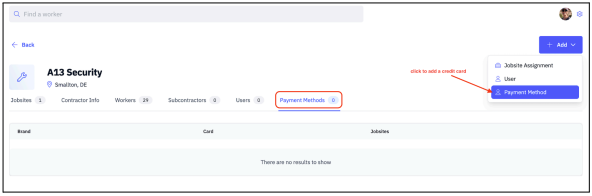
Access Payment Methods 2. Enter your credit card details in the pop-up window. This form is hosted by Stripe — Odin does not store your card information. Enter credit card details via Stripe 3. Your card will appear in the Payment Methods section once added. Card appears in Payment Methods

Associating a card with a jobsite

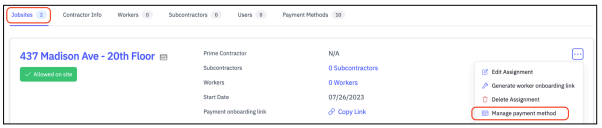
  1. Navigate to the Jobsites tab.
  2. Select More Options > Manage payment method.
  3. Select the card you want to associate with the jobsite.
Different credit cards can be assigned to different jobsites.

Removing a credit card

Follow the same steps as associating a card, and deselect the card to remove it from the jobsite.